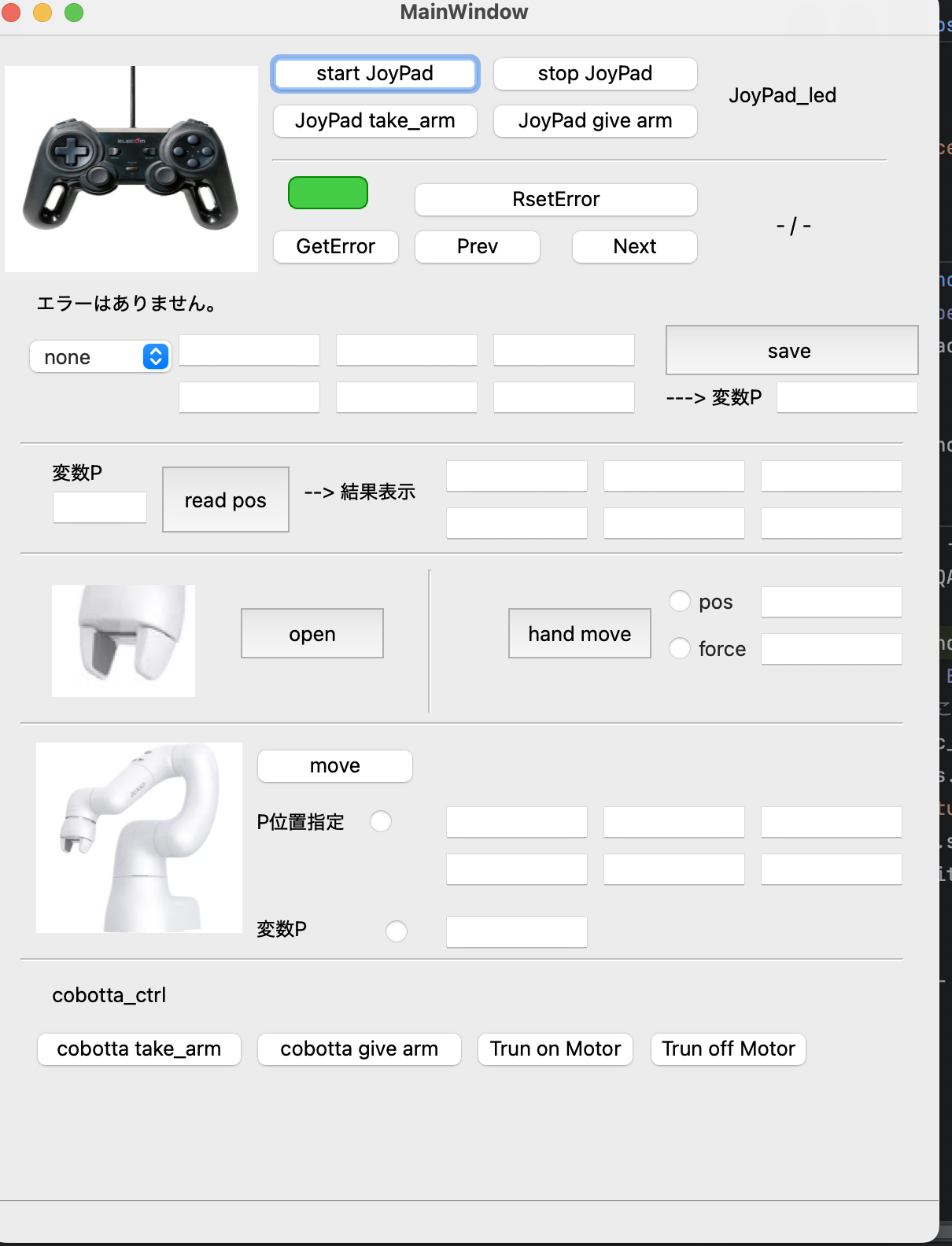
Controlling COBOTTA with a Joypad
Required software
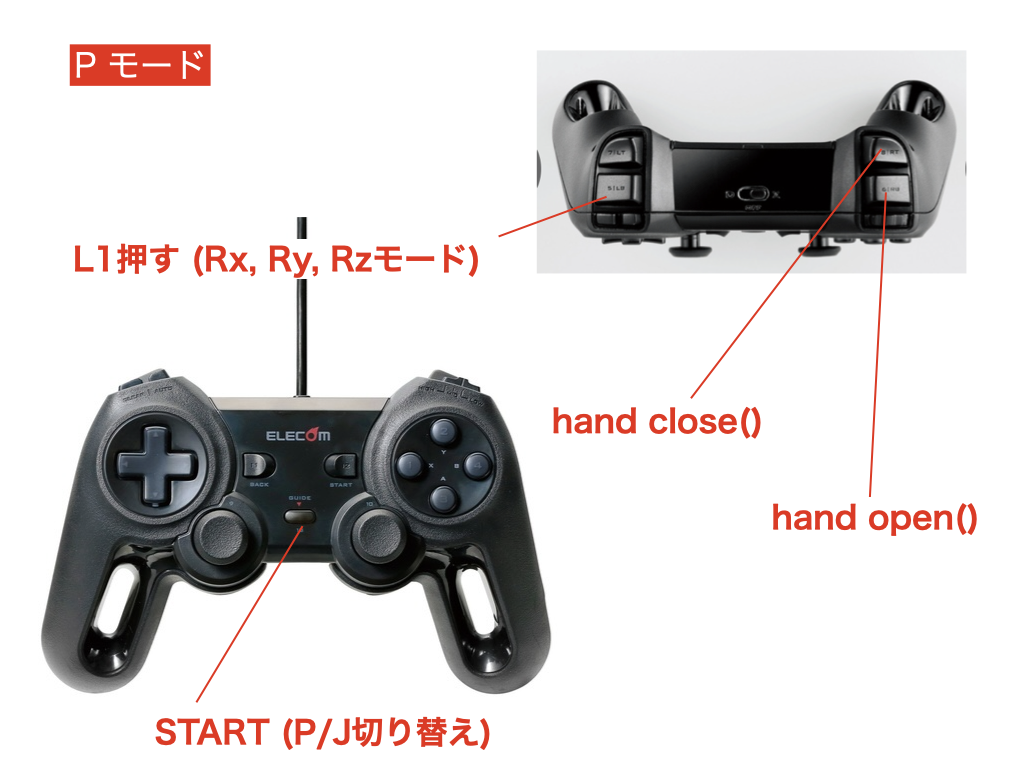
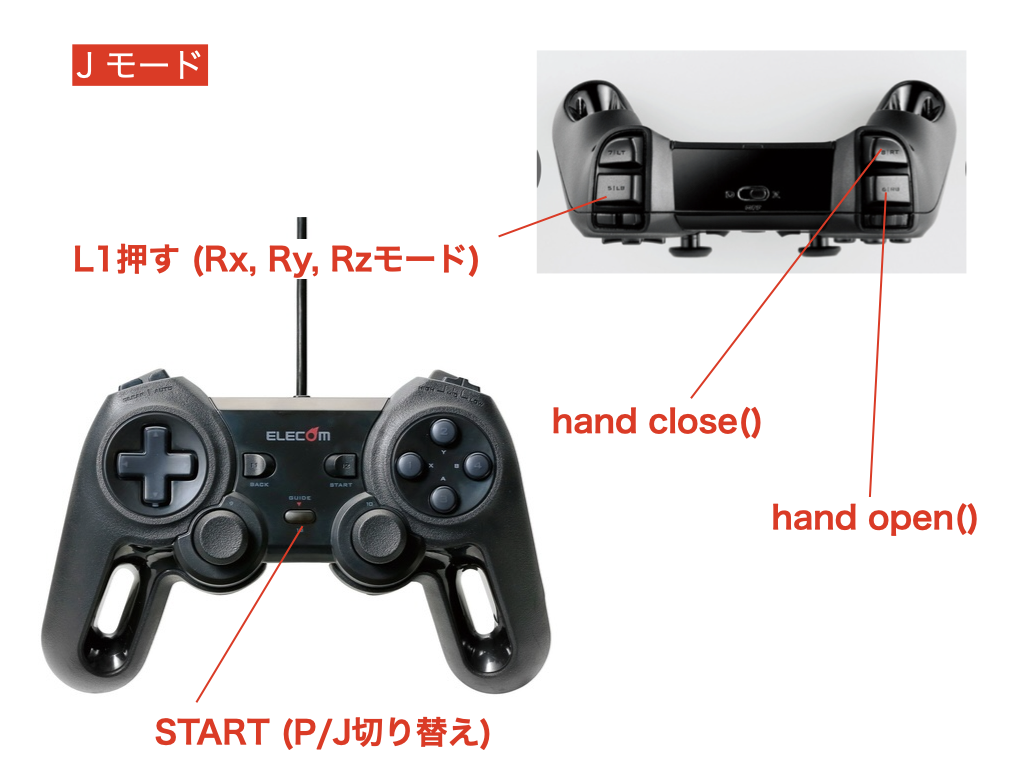
Joypad controls: switching between P and J modes
START
Joypad controls: speed adjustment
D-pad up and down.
Joypad controls: P mode (XYZ)
L1 released (default): position (XYZ) = left stick X → x, left stick Y → y, right stick Y → z.
L1 pressed: rotation = left stick X → rx, left stick Y → ry, right stick Y → rz.
Joypad controls: J mode (J1–J6)
L1 released (J1–J4): left X → J1, left Y → J2, right Y → J3, right X → J4.
L1 pressed (J3–J6): left X → J3, left Y → J4, right Y → J5, right X → J6.
Gripper
R1 pressed (once on the rising edge):
hand_open().R2 pressed (once on the rising edge):
hand_close().
Starting the joypad program without a GUI
This method uses only the programs provided in the current cobotta2 module.
server script
Start this script on a machine that is authorized to communicate with COBOTTA.
#!/usr/bin/env python3
from cobotta2 import Config
from cobotta2.server_grpc import joypad_server
from x_logger import XLogger


if __name__ == "__main__":

    Config.load_yaml("config_cobotta3_server2.yaml")

    # ---- cobotta
    # BCAP_HOST = "10.170.10.37"
    BCAP_HOST = Config.COBOTTA_IP
    # BCAP_PORT = 5007
    BCAP_PORT = Config.BCAP_PORT
    # ---- joypad
    # GRPC_HOST = "10.170.10.38"
    GRPC_HOST = Config.SERVER_IP
    # GRPC_HOST = "0.0.0.0"
    # # GRPC_HOST = "localhost"
    # GRPC_PORT = 50051
    GRPC_PORT = Config.JOYPAD_PORT
    # JOYPAD_INTERVAL = 0.01
    JOYPAD_INTERVAL = Config.JOYPAD_INTERVAL

    LOG_LEVEL = "debug"

    logger = XLogger(
        log_level=LOG_LEVEL,
        logger_name=Config.JOYPAD_LOGGER_NAME,
        # log_mode="rotate",
        # log_mode="file",
        # log_name=f"c:/opt/log/{Config.JOYPAD_LOGGER_NAME}.log",
    )

    # JoyPad Server
    joypad_server(
        bcap_host=BCAP_HOST,
        bcap_port=BCAP_PORT,
        grpc_host=GRPC_HOST,
        grpc_port=GRPC_PORT,
        interval=JOYPAD_INTERVAL,
        logger=logger,
        log_level=LOG_LEVEL,
    )
To use a YAML configuration file, prepare a file containing the following settings:
# --- cobotta-server
SERVER_IP: "10.170.10.38"
SERVER_PORT: 8000
CLIENT_LOGGER_NAME: "cobotta1_client"
SERVER_LOGGER_NAME: "cobotta1_server"
TIMEOUT: 5
LOGGER_LEVEL: "debug"
# --- joypad-server
JOYPAD_PORT: 50051
JOYPAD_LOGGER_NAME: "cobotta1_joypad"
# --- cobotta
COBOTTA_IP: "10.170.10.37"
COBOTTA_CAMERA_IP: None
Running the client on the PC connected to the joypad
The client can run on the same machine as joypad-server or on a different machine. Poor network conditions may introduce latency.
#!/usr/bin/env python3
"""
Step-based invocation.
Called from an independent GUI loop to keep the main and JoyPad loops on the same thread.

On macOS, SDL objects such as joystick/game objects may fail when accessed
outside the main thread. Use a while/step loop instead of start/stop.

Kengo NAKADA
kengo.nakada@mat.shimane-u.ac.jp
kengo.nakada@gmail.com
"""
from typing import Any, Dict, List, Optional, Union, Tuple, Callable, Sequence
import time

# import grpc

from cobotta2.server_grpc import JoyPadClient
from cobotta2.server_grpc import InputGrpcClient


def step(
    logger: Optional[Any] = None,
    log_level: str = "INFO",
) -> None:
    """
    Start the step-based client (work around SDL thread constraints).
    """
    from cobotta2.pad import InputGrpcClient

    if logger is None:
        import logging

        logging.basicConfig(level=log_level.upper())
        logger = logging.getLogger(__name__)

    logger.info("[CLIENT] JoyPad gRPC client main start")

    client = JoyPadClient(
        server_ip="10.170.10.38",
        server_port=50051,
        logger=logger,
        log_level=log_level,
    )

    if not client.is_connected():
        logger.error("[CLIENT] gRPC connection failed")
        return

    logger.info("[CLIENT] connected")

    client.reset_error()
    client.motor_on()
    client.take_arm()

    client.joypad_set_scale(9.0)
    client.joypad_start()

    input_pad = InputGrpcClient(
        grpc_client=client,
        interval=0.02,
        logger=logger,
    )

    try:
        while True:
            input_pad.step()
            time.sleep(0.02)
    except KeyboardInterrupt:
        logger.info("[CLIENT] KeyboardInterrupt")
    finally:
        client.joypad_stop()
        client.give_arm()
        client.motor_off()
        logger.info("[CLIENT] JoyPad gRPC client main end")


if __name__ == "__main__":
    from x_logger import XLogger

    log_level_ = "INFO"
    logger_ = XLogger(log_level=log_level_, logger_name="JoyPadClient")
    step(log_level=log_level_, logger=logger_)
Using the GUI