RMC_POT cfg File Format
This document explains the Version 3 RMC_POT cfg configuration format using a concrete example.
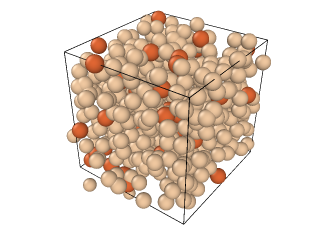
Example: Excerpt from aaa.cfg
The following is an excerpt from a typical cfg file. The first line must be preserved verbatim.
aaa.cfg
 (Version 3 format configuration file) !file created by SimpleCfg::save !
comment sio2


               0               0               0               0               0               0               0               0               0               0               0               0               0 moves gen, tried, acc, pot-acc, swap-gen, swap-acc, E0shift-gen, E0shift-acc, I(Q)mu-gen, I(Q)mu-acc, f'shift-gen, f'shift-acc, goodnonlinreg
          0              configurations saved

        300 molecules of all types
          3 types of molecules
          1 is the largest number of atoms in a molecule
          0 Euler angles are provided

          F (box is cubic)
            Defining vectors are:
              7.635000   0.000000   0.000000
              0.000000   7.635000   0.000000
              0.000000   0.000000   7.635000

        100 molecules of type  1
          1 atomic sites
              0.000000   0.000000   0.000000

        160 molecules of type  2
          1 atomic sites
              0.000000   0.000000   0.000000

         40 molecules of type  3
          1 atomic sites
              0.000000   0.000000   0.000000

 0.469499871368697  0.860252930085134  0.143086911460380
 0.506517212128356  0.782365058978389  -0.044207465828422
 0.424472315756385  -0.948087206561890  0.159658069155206
 0.519361825199738  0.779885605592665  0.290516312927309
 0.447290765121153  -0.667661128775380  0.036773942632613
 0.454085926915521  0.047929672102161  -0.361803986548788
 0.382807239777341  -0.107567570857891  -0.467392567413229
 0.322093601270465  0.152408219423707  -0.261319106024885
 0.617544006208252  0.075438279462999  -0.325725383837590
 0.032760774708579  0.186415932416503  -0.177798618166339
 0.899782755769483  0.086198503510151  0.756794255625409
Explanation of Each Section (in File Order)
First line (required)
The first line is:
(Version 3 format configuration file) !file created by SimpleCfg::save !
Copy this line exactly as shown; do not modify it.
Comment line
comment sio2
This is a comment.
Total count and molecular summary (when using molecular information)
The molecular information begins at line 8 of the example.
300 molecules of all types
In this example, RMC is performed using atomic information only, without explicit molecular information. Accordingly, this field gives the total number of atoms.
Number of types, molecule size, and Euler angles
3 types of molecules
1 is the largest number of atoms in a molecule
0 Euler angles are provided
Specify the number of atomic species. Here there are three species, so the value is 3. Because molecular information is not used, set the second line to 1 and the third to 0.
Simulation cell (box) information
  F (box is cubic)
    Defining vectors are:
      7.635000   0.000000   0.000000
      0.000000   7.635000   0.000000
      0.000000   0.000000   7.635000
For the cubic cell used here, enter half the edge length, L/2. In this example, 15.27 Å / 2 = 7.635 Å.
Population and number of sites for each atomic (molecular) type
Next, specify the number of atoms of each species.
100 molecules of type  1
  1 atomic sites
      0.000000   0.000000   0.000000

160 molecules of type  2
  1 atomic sites
      0.000000   0.000000   0.000000

 40 molecules of type  3
  1 atomic sites
      0.000000   0.000000   0.000000
In this example, type 1 has 100 atoms, type 2 has 160 atoms, and type 3 has 40 atoms. The atomic coordinates that follow are ordered by species: type 1, then type 2, then type 3.
Coordinate block (end of file)
Atomic coordinates appear at the end of the file.
 0.469499871368697  0.860252930085134  0.143086911460380
 0.506517212128356  0.782365058978389  -0.044207465828422
 0.424472315756385  -0.948087206561890  0.159658069155206
 0.519361825199738  0.779885605592665  0.290516312927309
 0.447290765121153  -0.667661128775380  0.036773942632613
 0.454085926915521  0.047929672102161  -0.361803986548788
 0.382807239777341  -0.107567570857891  -0.467392567413229
 0.322093601270465  0.152408219423707  -0.261319106024885
 0.617544006208252  0.075438279462999  -0.325725383837590
 0.032760774708579  0.186415932416503  -0.177798618166339
 0.899782755769483  0.086198503510151  0.756794255625409
These coordinates are expressed in the range (-1, 1), with the center of the cubic cell as the origin. In other words, atomic coordinates are scaled relative to the cell size. For example, if the edge length is L = 15.27 Å, a cfg coordinate of (0.5, 0.5, 0.5) corresponds to the Cartesian position (3.8175 Å, 3.8175 Å, 3.8175 Å) relative to the cell center.
\[\begin{split}x_{\mathrm{center}} = x_{\mathrm{cfg}}\frac{L}{2}\\ x_{\mathrm{corner}} = (x_{\mathrm{center}}+L/2)\bmod L\\ x_{\mathrm{cfg}} = 2\frac{x_{\mathrm{center}}}{L}\end{split}\]The conversion is given by these equations. Here, \(x_{\mathrm{center}}\) is the Cartesian coordinate relative to the cell center, while \(x_{\mathrm{corner}}\) uses the cell corner as its origin. When converting to VASP Cartesian coordinates, check the lattice vectors and origin convention used in the POSCAR file.
Practical Notes / Checklist
Do not delete or modify the first (version) line.
Ensure that the counts and ordering of
types,atomic sites, andmolecules of typeconform to the requirements of the software reading the cfg file.List all coordinates of type 1 first, followed by all coordinates of type 2, and so on (as expected by many implementations).
In this example, the defining vectors represent the half-edge length \(L/2\) of the cubic cell. Verify the coordinate conventions before applying this interpretation to other file formats.