Overview of the COBOTTA Client Using Device Class and Device Proxy
To use COBOTTA within SUSANOO, a Device Class and a Device Proxy are required. The Device Class implements the actual COBOTTA control.
CobottaCtrl() is provided as a higher-level interface, with either b-CAP or ORiN2 selectable as its backend.
To control COBOTTA directly through CobottaCtrl() without a communication layer, the code looks approximately like this:
from cobotta2 import CobottaCtrl
client = CobottaCtrl()
client.move("P100")
This is a simplified example and will not run as written, but illustrates the concept.
With the distributed control framework ese774_frame, the client side can instead be written as:
import asyncio
from ese774_frame import DeviceProxy

async def main():
    client = DeviceProxy("CobottaCtrl")
    await client.move("P100")
asyncio.run(main())
For synchronous use:
import asyncio
from ese774_frame import DeviceProxy

client = DeviceProxy("CobottaCtrl", async_mode=False)
client.move("P100")
The architecture uses the Factory design pattern. For example, an electronic balance can be accessed as follows:
import asyncio
from ese774_frame import DeviceProxy

client = DeviceProxy("AanddReader", async_mode=False)
client.meas()
The key point is that the Device Class is selected by passing a string to DeviceProxy, rather than by passing the concrete class.
For example:
import asyncio
from ese774_frame import DeviceProxy

device_class = "AanddReader"
client = DeviceProxy(device_class, async_mode=False)
client.meas()
This makes it possible to switch the client dynamically. It is a natural design pattern in Python and an important technique for writing flexible programs.
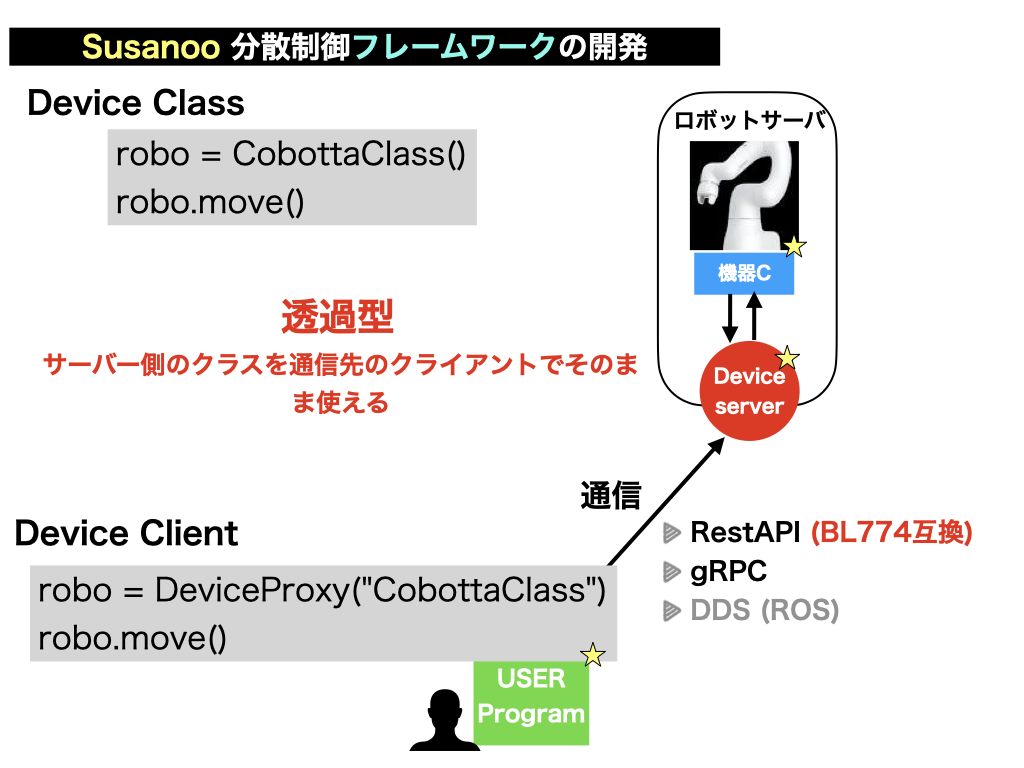
Returning to SUSANOO, the key feature of the framework is that the Device Class, although it resides on the device side, appears to exist transparently on the client PC through DeviceProxy.
The implementation actually resides on the server, but the framework exposes it automatically to the client. Users therefore do not need to deal explicitly with most of the communication details. This is the defining feature of the transparent DeviceProxy approach.
It is also possible to work directly with the concrete device client class:
import asyncio
from cobotta2.server import AsyncCobottaClient

client = AsyncCobottaClient()
client.move("P100")
However, this approach is somewhat more verbose in Python, because separate asynchronous and synchronous classes exist:
import asyncio
from cobotta2.server import SyncCobottaClient

client = SyncCobottaClient()
client.move("P100")
On the other hand, direct use of the concrete class can make the actual execution model easier to understand. Both styles are supported.
Registering a DeviceClass with DeviceProxy
Register the DeviceClass (DeviceClient) with DeviceProxy:
from cobotta2.server import AsyncCobottaClient,SyncCobottaClient
from cobotta2.server import cobotta_ctrl_api_spec
from ese774_frame.clients import register_device_proxy

register_device_proxy(
    "CobottaCtrl",
    async_client_cls=AsyncCobottaClient,
    sync_client_cls=SyncCobottaClient,
    api_spec=cobotta_ctrl_api_spec,
    default_async_mode=True,
    aliases=["cobotta"],
)